


Goldie: Schedule Appointments
4.81.81K Reviews
App Specs
- Version
- 62.0.1
- Updated On
- License
- Free
- Downloads
- 500,000+
- Developer
- Quartet
- Categories
- Productivity
- Platform
- Android
Screenshots

 Analysis by AppCompare
Ever found yourself drowning in appointment chaos and wishing for a magic wand to sort it all out? Well, let me introduce you to Goldie: Schedule Appointments. This app is like having a personal assistant in your pocket, ensuring you never miss a beat.
When a schedule needs to be readable at a glance
I find a booking tool most useful when it answers a simple question quickly: what is already committed, and where is there room for something else? Goldie is aimed at appointment-based work, so it makes more sense for a stylist, tutor, consultant, or other independent service provider than for someone who only needs a place to jot down occasional reminders. That focus can make the day easier to scan than a general calendar filled with personal events, errands, and client visits all mixed together.
Goldie is a productivity app from Quartet, and it has built a sizable audience: it has over 500,000 installs and an average rating of 4.8 from around 12,000 ratings. That’s encouraging context, though popularity alone cannot tell me whether a particular workflow will fit. I’d judge it by whether the way you handle bookings is clear to you, especially when the day gets busy and you need to move between appointments without losing track of who is coming next.
For a small operation, the useful distinction is not simply “calendar versus no calendar.” It is whether booking information stays connected to the person and the service. A general calendar is flexible, but it often leaves you managing client details elsewhere. A dedicated appointment planner can reduce that mental switching, provided you are comfortable keeping that work in a separate tool from your personal schedule.
Getting Started with Goldie
First things first, downloading Goldie: Schedule Appointments is a breeze. Available on both Android and iOS, you can find it easily on the Play Store or App Store. Once installed, the user-friendly interface welcomes you with open arms. It’s got this clean, intuitive design that even my tech-challenged cousin could navigate without breaking a sweat.
That first impression matters for people who do not want to spend an afternoon configuring a complicated business system. I would still take a few minutes before relying on it for real bookings: add a sample appointment, check how it appears in the schedule, and see whether the information you need is easy to find. A quick trial run is more useful than assuming any app’s layout will suit your habits immediately.
Features That Make Life Easier
What’s really cool about Goldie is how it integrates seamlessly with your existing calendar apps. Whether you're a Google Calendar loyalist or an Apple Calendar devotee, syncing is smooth. This means all your appointments are in one place, reducing the risk of double-booking or missing an important meeting.
Worth Reading Before You Choose

EA SPORTS FC Mobile 26 Is a Bigger Football Game, but It Takes Time

Flipboard Shows What News Apps Must Do Beyond the Feed

Switching to Android Auto Means Rethinking Your Driving Routine

Google Calendar Makes a Crowded Week Easier to Manage

Ludo King Makes the Most of the Minutes Between Plans

Baby Panda World Brings Quick Play to Modern Phones, but Its Game Library Feels Busy
Calendar syncing is particularly helpful when work and personal commitments compete for the same hours. I’d treat the calendar you already rely on as the broader view, then use Goldie for the appointment work that benefits from client context. That division can be convenient, but it also means you should check which calendar is the source of truth for a change. If you move an appointment in one place and expect the other to follow instantly, a sync delay can cause confusion.
A practical habit is to review the day in one place before opening your doors or starting calls, rather than assuming every change made at the last minute has already appeared everywhere. This is a small safeguard, not a reason to avoid syncing. It is simply sensible when a missed update could leave a customer arriving at the wrong time.
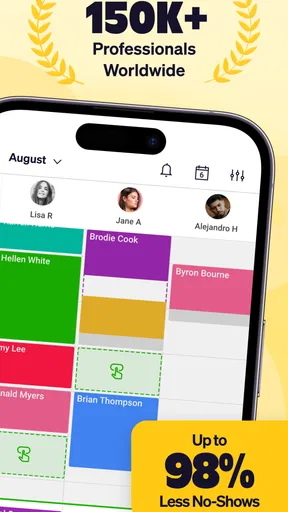
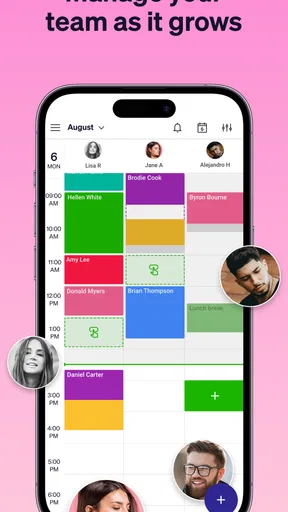
Goldie stands out with its color-coding feature. You can assign different colors to different types of appointments. For instance, blue for work meetings, green for personal events, and red for those dreaded dentist appointments. This visual organization is a lifesaver when you’re glancing at a packed week.
Colors become more useful when they represent a consistent rule instead of a changing decoration. I’d choose a small set of categories that answers a real planning question—for example, separating service types or distinguishing work from personal commitments—and keep those meanings steady. Too many colors can make a calendar harder to interpret, especially for someone who relies on labels or has difficulty distinguishing similar shades. The key is to pair the visual cue with clear appointment details rather than expecting color to carry all the information.
Taking Appointment Management to the Next Level
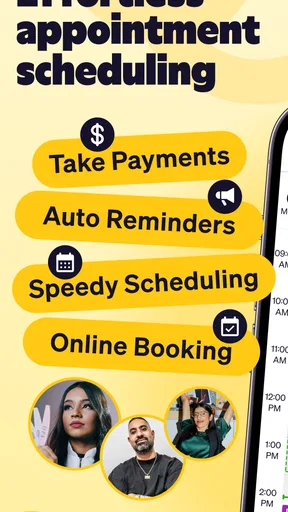
One of my favorite features is the automated reminders. Forgetting appointments is a thing of the past. Goldie sends you timely alerts, so you're always ahead of the game. Plus, you can customize these reminders to suit your needs. Want a reminder a day before or just an hour before? You got it!
Reminders are most effective when they match the kind of appointment and the amount of preparation it needs. A short check-in may only need a prompt near the start, while a visit that requires setup or travel calls for more lead time. I’d avoid turning every alert on at the same interval: too many notifications can become background noise, and then the one that matters is easier to dismiss without reading.
There is also a useful difference between a reminder for the person running the schedule and a confirmation for the person being booked. Goldie’s booking and client tools make it more suitable for customer-facing appointments than a basic alarm app, but I’d still review the wording and timing of any message before making it part of a routine. The goal is to make arrival expectations clear, not to create a stream of notifications that clients learn to ignore.
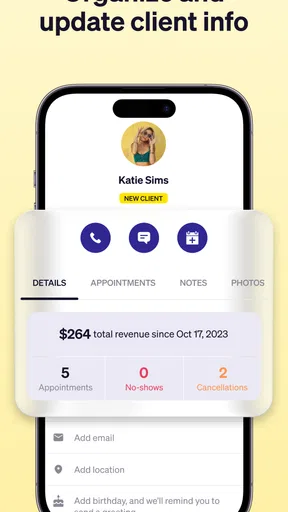
Another nifty tool is the client management system. If you're a freelancer or a small business owner, this is pure gold. You can store client information, track appointment history, and even send out appointment confirmations and reschedules. It's like having a mini CRM built right in.
That history can help with the everyday details that are easy to forget between visits: whether someone is a returning client, when you last saw them, or whether a booking has changed. It is not automatically a replacement for every customer-management system, though. If your work depends on extensive sales records, team-wide reporting, or a large set of customer fields, compare those needs carefully before moving all client administration into a lightweight appointment app.
For privacy-conscious users, client information deserves the same care as a paper appointment book left on a desk. I’d store only details that genuinely help deliver or manage the appointment, and I would avoid treating a scheduling tool as a place for unrelated sensitive notes. That keeps records more useful and reduces the amount of personal information sitting in any one workflow.
Why Goldie is a Game-Changer
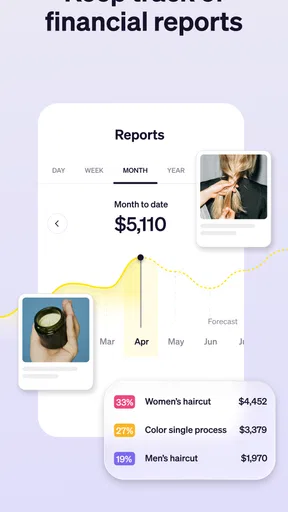
Beyond appointments, Goldie helps in managing your time better. By visualizing your schedule, you can identify free slots and optimize your day. This is especially handy if you’re juggling multiple roles or gigs. It’s almost like Goldie whispers, "Hey, you have a free hour there, maybe take a break?"
Here’s a realistic way I’d use that view: a self-employed provider starts the morning with several client visits, a gap around midday, and a rescheduled booking later on. Seeing the open stretch beside the appointments helps them decide whether to accept another client, leave time for travel, or use the gap for lunch and follow-up work. The valuable choice is not always to fill every opening. A schedule that looks full can still be impractical if it leaves no breathing room for overruns or preparation.
That is where an appointment-focused planner compares well with a paper diary or a plain calendar: it can bring bookings, client context, and reminders closer together. Paper remains appealing if you prefer writing by hand or need a schedule that works without looking at a screen. A general calendar may be the better choice for shared family plans or broad event management. Goldie makes most sense when appointments are central to your work and you want them managed with client-facing steps in mind.
The app's design is sleek and modern, with a focus on ease of use. The developers have clearly prioritized user experience, ensuring that even the least tech-savvy among us can harness its full potential.
Using it across different abilities and situations
Clear visual organization can help someone who finds long written lists tiring, while reminders may support people who have trouble keeping several appointment times in working memory. But those benefits depend on personal preferences: a color-coded view is not helpful to everyone, and an alert can be disruptive for someone sensitive to frequent sounds or vibrations. I’d try the display and notification choices in a low-stakes week, then adjust the routine to what actually helps rather than what seems ideal on paper.
Motor needs matter too. Any phone-based scheduler asks you to tap accurately and enter information, which can be frustrating if small controls or repeated typing are difficult. A useful approach is to prepare recurring client details carefully and avoid leaving every booking until the last minute, when rushed edits are more likely. If another person helps manage appointments, agree on a clear process for who edits the schedule so changes do not become a game of guesswork.
Situational access is another consideration. A sole operator who is usually at a desk may find a phone planner easy to check, while someone working with gloves, moving between rooms, or serving customers continuously may not be able to look at a screen whenever an alert arrives. In that case, the schedule should support a routine that can be checked between tasks, rather than relying on constant phone access. Goldie can organize appointments, but it cannot remove the practical limits of a busy workplace.
A Few Things to Keep in Mind
Now, no app is perfect, right? While Goldie is mostly a joy to use, there are a few quirks. Occasionally, syncing across devices might take a moment longer, especially if you’ve got a ton of appointments. It's not a deal-breaker, but something to note if you’re often on the go.
That small delay is worth taking seriously when more than one device or person is involved. Before acting on a booking change, check that the latest version of the schedule is visible. If your business depends on several staff members editing appointments at once, test that collaboration pattern before making it the backbone of your operation. A tool that feels simple for one person may need more coordination when a team shares responsibility.
Goldie is free to download, with in-app purchases ranging from $2.99 to $199.99 per item. I would check the current purchase options against the features I actually need before building a workflow around a paid capability. The app is rated for Everyone, and its current version is 52.4.0, with Android 8.0 as the minimum operating system requirement. It was released on October 30, 2014, and has around 1,800 written reviews. Those details are useful context, but the best test is still whether the booking process feels manageable on your own device.
One remaining barrier is that a feature-rich schedule can still demand regular attention: appointments have to be entered accurately, changes need checking, and client records need sensible upkeep. If you want a calendar that quietly handles every part of a complex business without any process changes, this may not be the right fit. Likewise, someone who rarely books clients may find a standard calendar simpler and less specialized.
Also, while the app is fantastic for individuals and small businesses, larger enterprises might find it a bit limited. But then again, it’s not trying to be an enterprise solution. It’s perfect for those who need a reliable, straightforward scheduling tool.
I would also skip it if your work needs a highly customized team system, extensive operational reporting, or a booking process that depends on tools you already use and do not want to change. In those cases, a broader business platform may justify its extra complexity. For an independent professional, though, that complexity can be its own cost: more setup, more places to check, and more training before anyone can confidently make a simple appointment change.
In conclusion, Goldie: Schedule Appointments is a powerful ally for anyone looking to streamline their scheduling woes. It's like having a personal assistant that never takes a day off. Whether you’re managing work meetings, personal appointments, or client bookings, Goldie has got your back. So, why not give it a try and see how it transforms your scheduling game?
Who will get the most from it
My recommendation is strongest for a solo service provider who handles repeat appointments and wants a clearer link between the calendar and client history. Before depending on it, I’d test three ordinary tasks: create a booking, change its time, and find the client again afterward. If those steps feel natural, then check whether reminders and calendar syncing fit your routine. That short trial reveals more than a long feature checklist because it mirrors the work you will actually do each week.
For someone deciding between Goldie and a general planner, the deciding question is whether client booking is the main job or just one small part of a much wider schedule. If it is central, Goldie’s appointment-first approach is appealing. If you mainly need shared events, flexible project planning, or a broad personal calendar, your existing calendar may be enough. I like Goldie best when it gives a small business a more organized booking routine without asking the owner to adopt a full enterprise system.
Pros
- User-friendly interface for easy navigation.
- Customizable appointment reminders.
- Seamless integration with calendars.
- Supports multiple appointment types.
- Real-time synchronization across devices.
Cons
- Limited free version features.
- Occasional sync delays reported.
- No offline access available.
- Requires account setup to use.
- May not support all calendar apps.
FAQs for Goldie: Schedule Appointments
What is Goldie: Schedule Appointments and who is it for?
Goldie: Schedule Appointments is a versatile scheduling app designed for professionals who need to manage appointments efficiently. It caters to freelancers, service providers, and small business owners who require a reliable tool to organize client bookings, set reminders, and streamline their workflow. With its user-friendly interface, it’s perfect for anyone looking to enhance time management and customer service.
How does Goldie integrate with my existing calendar and contact apps?
Goldie seamlessly integrates with popular calendar and contact applications, ensuring that all your appointments and client information are synchronized across platforms. This integration helps you avoid double bookings and ensures that your schedule is always up-to-date. You can easily import contacts and events, making the transition to Goldie smooth and hassle-free.
What features does Goldie offer to improve appointment management?
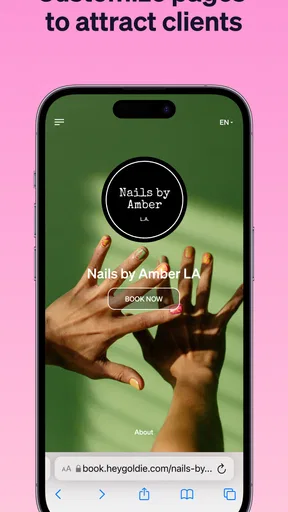
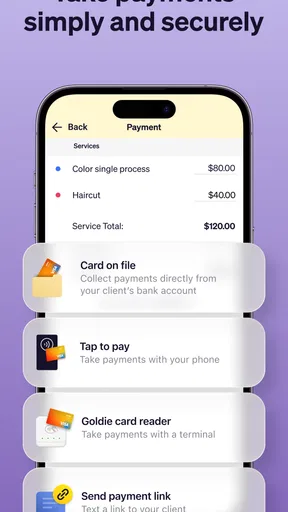
Goldie offers a range of features including appointment scheduling, automated reminders, client management, and payment processing. The app allows users to customize their booking page, manage cancellations, and reschedule appointments with ease. These features are designed to reduce no-shows, improve client communication, and provide a seamless booking experience for both parties.
Is Goldie secure and how does it protect my data?
Yes, Goldie prioritizes user security and employs robust encryption methods to protect your data. All client information and appointment details are securely stored, ensuring that your business remains compliant with data protection regulations. Regular updates and security audits are conducted to maintain the highest standards of privacy and security.
Are there any costs associated with using Goldie?
Goldie offers both free and paid plans. The free version includes basic scheduling features, while the premium plan unlocks advanced functionalities such as additional customization options, priority support, and enhanced integrations. Users can choose the plan that best fits their business needs, with the flexibility to upgrade or downgrade as required.


